CTR Manipulation Tools: How They Work and What to Check
You set a CTR campaign running and then wait for proof that anything happened. Some tools report clicks but never show the visit, so you cannot tell a real search from a failed one. This article explains how CTR manipulation tools actually work and what to check before paying for one.
You will learn how campaign types differ across Google, Bing, Maps and AI Overviews, and how CTRTool handles desktop versus mobile visits. You will also get a checklist covering screenshot proof, keyword position tracking, failure credits and pricing, so you can judge a tool on evidence rather than promises.
What Is CTRTool? Campaign Types, Platforms and Who It Serves
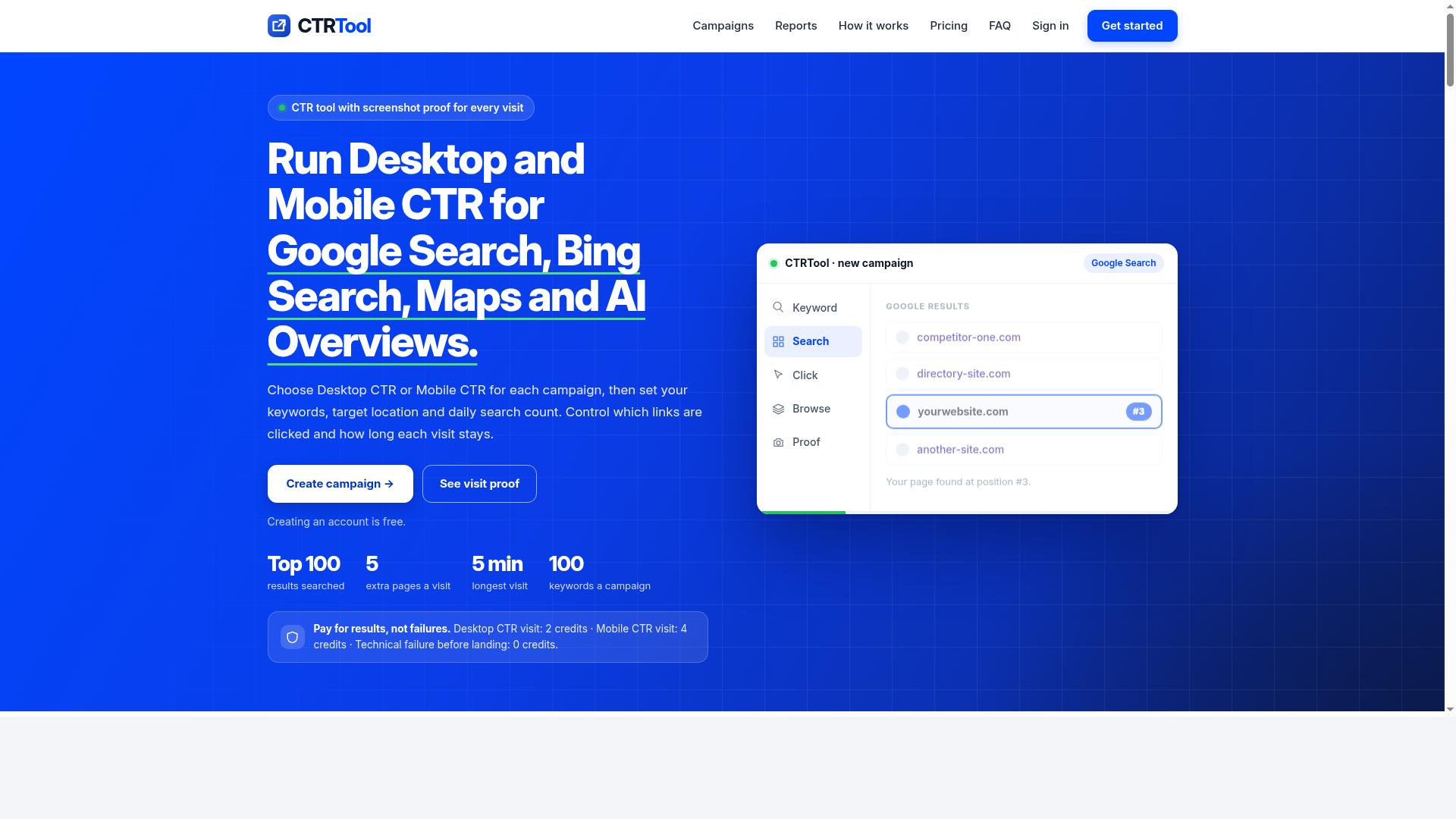
CTRTool is a SaaS platform that runs CTR campaigns for Google Search, Bing Search, Google Maps and AI Overviews, aimed at SEO practitioners and agencies. It positions itself as a CTR tool with screenshot proof for every visit, so users can see evidence of each search and click rather than taking activity on trust.
The platform offers four campaign types:
- Google Search CTR
- Bing Search CTR
- Google Maps CTR
- AI Overview CTR
Users choose Desktop or Mobile per campaign and can target a country, state and city. CTRTool serves SEO practitioners and agencies running campaigns for their own or client websites.
How CTRTool's Campaigns Work: Keywords, Locations, Daily Search Counts and Visit Paths
Each CTRTool campaign is configured around a target keyword, a chosen location, and a daily search count that determines how often the tool searches and clicks. Setup also covers Desktop or Mobile selection, a target URL, internal page URLs and link text, plus click order and scrolling time.
Location targeting can be a country, an optional state and city, or Any country. Daily search counts can run now, spread out, or with gaps, and users define days, hours and a time zone. Daily goals reset at 00:00 UTC, which keeps scheduling predictable across regions.
A campaign can hold up to 100 keywords, and search depth reaches up to 100 results. The tool performs the search, finds the target page within the top 100 organic results, and executes the click. Each visit follows a full visit path that includes internal pages, with up to five additional pages per visit and visits lasting up to five minutes in total.
Proof is built into the process. Search and landing screenshots are captured as separate proof images, and reports include full visit paths and keyword positions over time. Those position views cover Search positions, Maps listing order and AI citation order. The same campaign structure applies across Google Search, Bing Search, Maps listings and AI Overviews, with Maps campaigns able to scan up to 50 listings and AI Overview campaigns working through source links and citation order.
Delivery runs through Desktop Chrome windows and real Android phone sessions, matched to the target location through managed proxy routes. Custom form filling or other custom actions are available via support with a separate agreed one-time fee. It is worth noting the site's own position: automated visits do not guarantee rankings.
How CTR Manipulation Tools Work - and How CTRTool Delivers It
CTR manipulation tools simulate organic search behavior by automating clicks on target pages, often using proxy networks, IP rotation, and browser fingerprinting to avoid detection. Residential proxies and user-agent spoofing make automated clicks look like they come from ordinary searchers, while session simulation adds dwell time and internal page visits to mimic real engagement.
These systems face real obstacles. CAPTCHAs, click velocity limits, and pattern detection by search engine algorithms can flag or block suspicious traffic, so tools must vary click patterns and traffic sources to stay under the radar.
CTRTool takes a proof-first approach to search result clicks. Every visit is backed by screenshot proof, with search and landing screenshots captured as separate images, and full visit paths recorded. Keyword positions are tracked over time, giving users verifiable evidence rather than unconfirmed claims about CTR inflation.
Desktop vs. Mobile CTR, Maps Listings and AI Overview Citations
CTRTool lets users run separate Desktop and Mobile CTR campaigns. This separation matters because desktop and mobile searches behave differently, and a campaign built for one device type should not share execution details with the other.
Campaign types extend beyond standard search. Maps campaigns check up to 50 listings, roughly five pages, to locate the target business listing. AI Overview campaigns require a matching citation before a visit counts, which keeps results tied to the specific citation rather than a loose match.
Tracking goes deeper than a single position number. CTRTool follows keyword positions over time, including Maps listing order and AI citation order, so users can see movement within those surfaces, not just a flat rank. One credit balance is shared across all campaign types, websites and keywords, and visits that cannot verify the requested location use no credits. The pay-for-results model means no credits are charged for technical failures before landing, which keeps spend tied to visits that actually complete.
What to Check Before Choosing a CTR Tool - and How CTRTool Measures Up
Before committing to a CTR tool, evaluate proof of visits, tracking granularity, and billing fairness-three areas where CTRTool provides specific guarantees.
A credible tool should show verifiable evidence that each search result click actually happened, not just a summary count. It should also track keyword positions over time so you can connect campaigns to ranking movement. Finally, billing should charge only for visits that complete as intended.
CTRTool addresses all three: screenshot proof for every visit, full visit paths, keyword position tracking that includes Maps and AI Overviews, and a pay-for-results credit model. The sections below examine each criterion in detail.
Screenshot Proof for Every Visit and Full Visit Paths
CTRTool captures two separate screenshots for each visit: one of the search results page showing the click, and one of the landing page after the click. These are distinct proof images, so you can confirm both the search result click and the resulting page load.
Beyond screenshots, CTRTool records the full visit path, including the internal pages visited during the session. A visit can last up to 5 minutes with up to 5 additional internal pages. This matters because session simulation affects engagement metrics such as dwell time, bounce rate, and pogo-sticking signals.
Many tools offer only aggregate reports: a number of clicks delivered, with no way to inspect individual sessions. That leaves you unable to verify whether clicks occurred or whether sessions looked realistic to search engine algorithms.
With CTRTool, the screenshot pair and visit path give you session-level evidence rather than a summary. You can review whether a visit behaved like a genuine user session, which is the kind of behavioral signal that supports organic ranking outcomes.
Keyword Position Tracking, Including Maps Listing and AI Citation Order
CTRTool tracks keyword positions over time for each campaign, showing ranking changes in Google Search, Bing Search, Maps listings, and AI Overview citations. This goes beyond standard organic rankings to cover where your business appears in local listing order and in AI-generated answers.
Maps tracking covers listing order within the top 50 listings. AI citation order shows where your content is referenced in AI Overviews. Together these views help you see whether CTR campaigns correlate with ranking movements across multiple surfaces, not just the classic ten blue links.
This data supports strategy adjustment. If positions improve in Search but stall in Maps, you can shift focus accordingly. If AI citation order lags, you have a clearer picture of where to direct effort next.
Position tracking is included as part of the campaign dashboard, so ranking history sits alongside your campaign activity rather than in a separate report. Each campaign can track up to 100 keywords, and an account supports up to 100 campaigns.
Pay-for-Results Credits: No Charge for Technical Failures Before Landing
CTRTool operates on a credit system where credits are only consumed when a visit successfully reaches the landing page, not when technical issues prevent it. If a CAPTCHA, page-not-found error, or network failure stops a visit before landing, no credits are charged.
Visits that cannot verify the requested location also use no credits. A verified search without a match costs 1 credit, while a completed Desktop CTR visit costs 2 credits and a Mobile CTR visit costs 4 credits. This structure means you pay for results, not attempts.
Contrast this with tools that charge per attempt. Under an attempt-based model, failed sessions still drain your budget, and you absorb the risk of technical problems you cannot control. CTRTool's policy shifts that risk away from the user.
Credits are purchased through monthly plans, and one credit balance is shared across all campaign types, websites, and keywords. Unused credits roll over while your subscription stays active. Creating an account is free, and the full plan structure is covered in the pricing section.
CTRTool Pricing and Plans
CTRTool offers monthly plans in USD: Starter at $59/month for 2,000 credits (up to 1,000 Desktop CTR visits or 500 Mobile CTR visits) and Growth at $125/month for 5,000 credits (up to 2,500 Desktop or 1,250 Mobile visits). Two larger tiers cover heavier campaign volumes, and every plan is billed monthly.
The full lineup is simple to compare, and the Growth tier is marked Recommended on the site. The table below shows what each plan delivers.
| Plan | Price (USD/month) | Credits | Up to Desktop Visits | Up to Mobile Visits |
|---|---|---|---|---|
| Starter | $59 | 2,000 | 1,000 | 500 |
| Growth (Recommended) | $125 | 5,000 | 2,500 | 1,250 |
| Scale | $399 | 20,000 | 10,000 | 5,000 |
| Agency | $699 | 40,000 | 20,000 | 10,000 |
The site notes a limited launch price, with prices rising 30% on November 15 (the page also shows November 15, 2026). Anyone comparing tiers should factor that date into the decision.
Credits are not a flat currency across devices. A Desktop CTR visit costs 2 credits, while a Mobile CTR visit costs 4 credits, which is why the same credit balance buys half as many mobile visits. A verified search that returns no match costs 1 credit.
Most importantly, credits are only consumed for successful visits. A technical failure before landing costs 0 credits, so a broken session does not eat into the balance. This structure keeps spend tied to actual delivered visits rather than attempted ones.
Unused credits roll over while the subscription stays active, giving slower campaigns room to breathe. They expire once a cancellation takes effect, so credits are best treated as an active-plan resource. Creating an account is free, and custom development carries a separate, agreed one-time fee.
For readers weighing CTR manipulation tools, this credit model is one of the clearer parts of the offer: costs are itemized per visit type, failures are not billed, and rollover protects against wasted spend. That transparency is a point in CTRTool's favor when judging whether the pricing is fair.
Trust Signals: Eligibility Rules, Proof Standards and Legal Transparency
CTRTool publishes clear eligibility rules for campaigns: the target page must appear within the top 100 organic results for the chosen keyword and location, Maps campaigns check up to 50 listings, and AI Overview campaigns require a matching citation. These rules matter because a CTR manipulation tool can only simulate realistic search result clicks if the page is actually findable in the results it targets.
Eligibility works as a technical filter, not a marketing promise. A page outside the top 100 organic results has no realistic path to receive organic clicks, so the restriction keeps campaigns aligned with real SERP behavior. The same logic applies to Maps, where checking up to 50 listings (about five pages) defines the boundary of a feasible local campaign.
For AI Overview campaigns, the requirement is a matching source link. Without a citation tying the target page to the AI-generated answer, there is nothing for a simulated visit to plausibly follow. Stating these limits up front is a transparency signal: the tool tells you when a campaign cannot work instead of accepting an order that cannot deliver.
It is equally important to note what CTRTool explicitly does not guarantee. The platform states plainly that it does not promise higher rankings, leads or sales. That honesty about outcomes, paired with hard eligibility rules, is a stronger trust signal than any inflated claim about organic ranking gains.
Proof standards are the second layer of trust. CTRTool requires screenshot proof for every visit, along with full visit paths and position tracking. Together these give advertisers a verifiable record rather than a vague report of activity.
- Screenshot proof for every visit: each simulated search result click is documented visually, so activity can be checked rather than assumed.
- Full visit paths: the record shows how a visit progressed, which supports scrutiny of session simulation quality.
- Position tracking: campaigns are tied to the position the target page occupied, keeping expectations grounded in the actual SERP.
These standards matter because the CTR manipulation space has a credibility problem. Many services report clicks with no evidence, and buyers cannot tell automated clicks from fabricated numbers. A per-visit screenshot trail and documented visit paths make click patterns auditable, which is exactly what a careful buyer should demand before paying for any campaign.
Position tracking also reinforces the eligibility rules. If a page drifts out of the tracked position range, the proof record makes that visible, so the advertiser can judge whether the campaign still makes sense. This is practical impression-to-click ratio hygiene: activity should stay consistent with where the page actually ranks.
Legal transparency is the third pillar. CTRTool operates as a global online service and publishes both a Terms of use page and a Legal notices page. The Legal notices page states that country, state and city records are provided by CountryStateCity via the @countrystatecity/countries 2.0.0 package, under the Open Database License 1.0 and Database Contents License 1.0.
That level of attribution is unusual for tools in this category. Naming the data source and its licenses shows the site takes legal compliance seriously rather than copying data without credit. It also gives readers a concrete way to verify claims about the service instead of relying on marketing copy.
One limitation deserves mention for full transparency: support is handled by email at vaibhav@autoblogging.ai, and the site lists no phone number or physical address. Buyers who prefer phone support should weigh that. For everyone else, the combination of published eligibility rules, per-visit proof standards, and formal legal pages makes CTRTool a legitimate, verifiable service rather than an anonymous click farm.
Who Should Use CTRTool
CTRTool is designed for SEO practitioners and agencies running CTR campaigns for their own or client websites across Google Search, Bing Search, Google Maps, and AI Overviews. It is built for people who already understand how CTR manipulation fits into a broader SEO strategy, not for casual users looking for a shortcut.
The core audience is SEO professionals and agencies who need to influence click-through rate for ranking purposes. They typically manage multiple properties and want a single place to plan, run, and review campaigns.
Several distinct use cases make the tool a practical fit for this audience:
- Improving organic rankings for competitive keywords, where the impression-to-click ratio is low and the page needs stronger behavioral signals.
- Testing SERP behavior to observe how search result clicks and engagement metrics respond under controlled conditions.
- Managing client campaigns across several accounts, markets, and search surfaces without juggling separate setups.
Agencies in particular benefit from the multi-surface coverage. Campaigns can target Google Search, Bing Search, Google Maps, and AI Overviews, which matters when a client's visibility spans local packs and AI-generated answers as well as classic blue links.
According to the site's guidance, the tool also supports tier links and PBN (private blog) networks, along with test properties. That makes it relevant for practitioners who structure campaigns around layered link setups or who want a sandbox property to trial click patterns before applying them to a live site.
One caution applies to every user. CTR manipulation sits in grey-hat SEO territory, and search engine guidelines generally discourage attempts to artificially influence ranking signals. Anyone using CTRTool should understand the risk profile and make an informed decision about compliance for their own or client sites.
For SEO professionals who accept that trade-off, the tool's fit is clear: it serves practitioners and agencies running campaigns at scale, not beginners exploring behavioral signals for the first time.
Final Verdict
CTRTool distinguishes itself with screenshot proof for every visit, full visit paths, and pay-for-results credits, making it a transparent option for SEOs exploring CTR manipulation. The platform is built around verified delivery rather than vague promises, and that focus on proof is what separates it from the typical black-box offerings in this space.
The strengths are easy to summarize. Every campaign is backed by screenshot proof of each visit, and the reporting shows the full path a visitor takes through a page. Billing runs on credits that pay for results, so spending tracks actual delivered visits rather than upfront packages. Multi-platform support lets campaigns run across more than one search engine, which matters when SERP behavior differs between them.
There are real limitations to weigh as well. Eligibility rules restrict campaigns to pages that already rank within the top 100, so the tool cannot rescue a page with no organic presence at all. It is also intended for SEO practitioners who understand the risks of CTR manipulation, not for beginners looking for a push-button ranking fix.
The balanced verdict: CTRTool is a suitable choice for those seeking a proof-based CTR tool with detailed tracking and fair billing. Anyone using it should still consider search engine guidelines carefully, because automated clicks and behavioral signals sit in grey-hat territory and carry inherent risk. Practitioners who accept that trade-off will find the transparency here unusually strong.
For questions before committing, the support email listed in the FAQ is vaibhav@autoblogging.ai. The official website is https://ctrtool.com, where you can review the available pages, including Sign in, Create an account, Support, Terms of use and Legal notices.
Frequently Asked Questions
How do CTR manipulation tools actually work?
Most CTR manipulation tools simulate organic searches for your target keywords, then click through to your page in an attempt to influence click-through and ranking signals. CTRTool does this through structured campaigns for Google Search, Bing Search, Maps and AI Overviews, and it provides screenshot proof for every visit so you can verify the activity actually happened rather than taking it on trust.
What should I check before choosing a CTR tool?
Look for verifiable proof of visits, transparent campaign settings (device type, keywords, location targeting) and clear credit-based pricing. CTRTool is built around screenshot proof for every visit, with search and landing screenshots provided as separate proof images, plus full visit paths and keyword position tracking over time - all things you can audit instead of assuming.
Does CTRTool work for Google Maps and AI Overviews, not just regular search?
Yes. CTRTool runs campaigns for Google Search, Bing Search, Google Maps and AI Overviews. For Maps, campaigns check up to 50 listings (about five pages) to find your business listing and click its website, while AI Overview campaigns require a matching source link - so eligibility depends on your page meeting those campaign conditions.
How does CTRTool's pricing and credit system work?
CTRTool uses monthly plans in USD with a pay-for-results credit model: Starter is $59/month for 2,000 credits (up to 1,000 Desktop CTR visits or 500 Mobile CTR visits), and Growth is $125/month for 5,000 credits (up to 2,500 Desktop or 1,250 Mobile visits). You choose Desktop or Mobile CTR per campaign, so credit usage depends on the device type you select.
Can I target a specific country or city for my campaigns?
Yes. CTRTool lets you set keywords and target a chosen country, optionally narrowed to a state and city, or select "Any country" to use a mix of supported locations. Note that your page must appear within the top 100 organic results for the chosen keyword and location for a campaign to find and click it.
Who is CTRTool designed for, and how do I get support?
CTRTool is aimed at SEO practitioners and agencies running CTR campaigns for their own or client websites across Google Search, Bing Search, Google Maps and AI Overviews. If you have questions before or after signing up, you can reach support at vaibhav@autoblogging.ai.